
Projects / Dimmer
Version 1.4.1 · macOS · GPL-3.0
Dimmer
Your lid is a dimmer switch. Dimmer reads the angle from your MacBook’s hinge sensor and dims the keyboard backlight and screen as you close it, on ranges you set yourself.
Release alerts on X: follow @kalkmancode to hear when a new version is out.
Keyboard and screen · 100%
As the lid closes
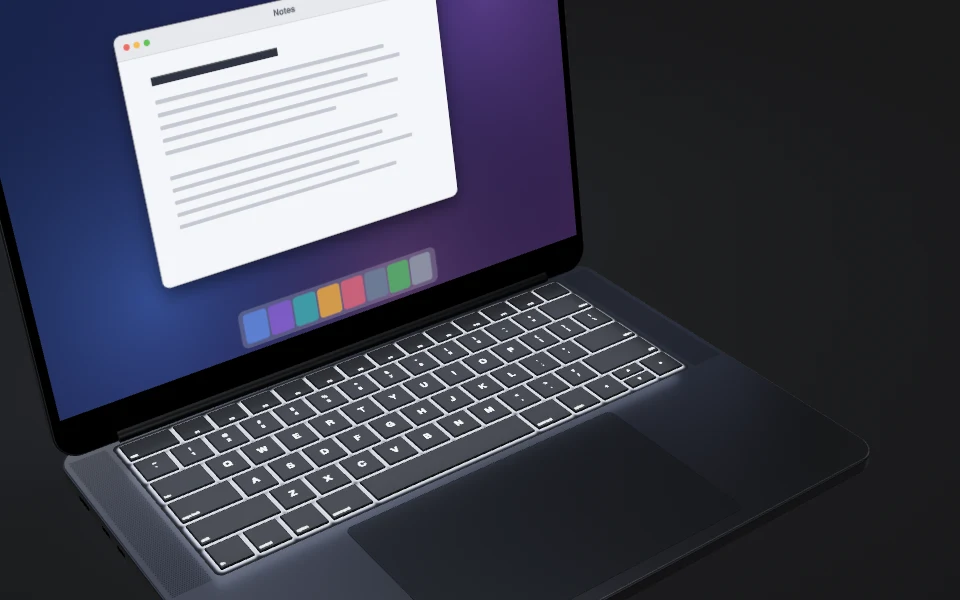
100°
Keyboard and screen at full brightness.
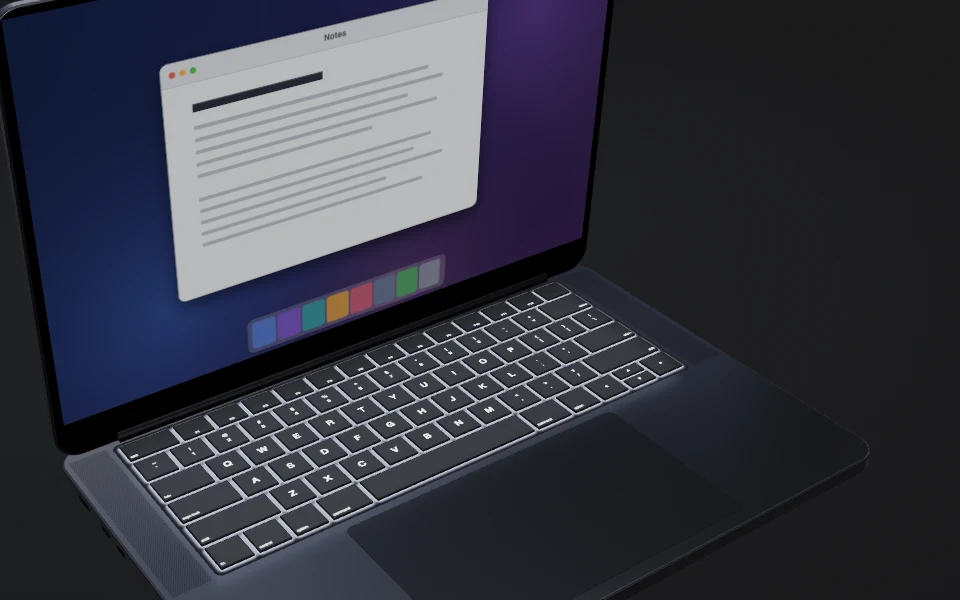
85°
Both fade with the lid.
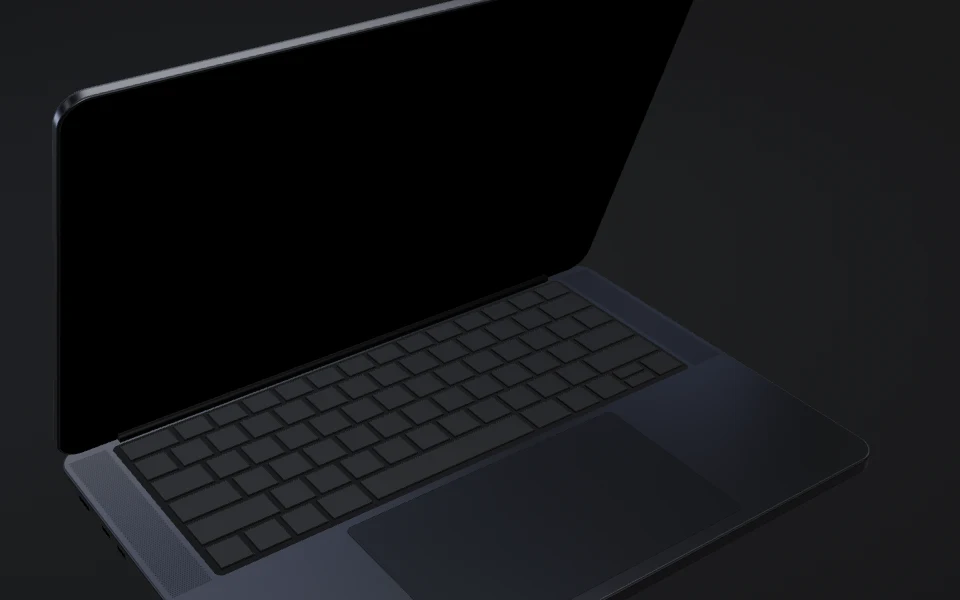
68°
Both are off.
Requirements at a glance
- System
- macOS 14 or later
- Hardware
- A readable lid-angle sensor is required for angle dimming
- Tested
- Only on a 16-inch MacBook Pro with M1 Max (2021), macOS 27.2; Intel is untested
- Permissions
- No Screen Recording, Accessibility or Input Monitoring permission
- Languages
- English, Spanish, Portuguese, German, French and Japanese
- Release
- Free, GPL-3.0, signed and notarised by Apple
Which Macs
| Mac | Lid sensor | Status |
|---|---|---|
| 16-inch MacBook Pro, M1 Max (2021) | Readable | Tested on macOS 27.2 |
| Intel MacBook Pro, 16-inch (2019) onwards | Model dependent | Intel is untested; only models with a readable sensor can use lid features |
| Other Apple silicon MacBooks | Model dependent | Sensor support and behaviour untested |
| Macs without a readable sensor | Unavailable | Ctrl+Cmd+P visual veil, Go dark and Keep awake still work; the veil is not a lock |
What it does
Keys fade as the lid closes
The keyboard backlight fades as the lid goes from 100 degrees to 68 by default, and is off before it shuts. Open the lid and it comes back. Change the brightness yourself and Dimmer leaves it to you; if macOS has dimmed the keyboard for inactivity, Dimmer leaves it dark.
The screen dims on its own range
The screen has its own range, separate from the keyboard’s, so it can start dimming later or stop sooner. Open the lid and it returns to your own brightness, even if automatic brightness moved it in between. Switch either off in Settings.
Snap to blur
Snap the lid quickly down into its zone, 68 to 99 degrees unless you change it, and every screen frosts over at once; closing it slowly never does. The veil is visual, not a lock. Typing, touching the trackpad or lifting the lid clears it, at the Clear speed you set. Off until you turn it on, with its own blur strength and Frost to Smoke tint, previewed in its box.
Control-Command-P
Press it in any app and every screen frosts over, pointer hidden, until you type, touch the trackpad or lift the lid. The visual veil is not a lock. It has its own blur strength and tint, previewed in its box. Change the shortcut in Settings, or switch it off in the Privacy veil box.
Blur by angle
An optional bar blurs the screen more as the lid closes, between two angles you set, with its own Frost to Smoke tint, previewed at full blur in its box.
Go dark and Keep awake
Go dark in the menu bar panel fades the keyboard and screen off without moving the lid; typing, the trackpad or moving the lid brings them back. Record an optional Go dark shortcut to use it from any app. Keep awake holds off idle sleep for 15 minutes, 1, 2 or 5 hours, or indefinitely.
Set it your way
Drag an end of a range sideways for its angle and up or down for its brightness, or type the number. Cmd+Z undoes an adjustment, and each box has its own restore link that resets only that box.
Light on your Mac
| Measure | With sensor | Sensorless |
|---|---|---|
| Memory at rest | 14 MB | 14 MB |
| CPU at rest | 1.38% | 0.039% |
| Lid to dim · median | 4.5 ms | Not measured |
| Lid to dim · 95th percentile | 7 ms | Not measured |
| Shortcut to veil · after the first press | 1.5 ms | Not measured |
| App size | 6.4 MB | 6.4 MB |
| Disk image size | 2.6 MB | 2.6 MB |
Measured on Dimmer 1.4 builds on a 16-inch MacBook Pro with M1 Max (2021), macOS 27.2, while the Mac was busy with other work. Memory is the physical footprint and CPU the five-minute mean, both at rest. Lid to dim runs from the poll first seeing the lid move to the keyboard brightness write, so it leaves out up to 100 ms between polls. Both timings come from a Debug build; the first shortcut press of a session takes about 50 ms because it creates the veil window.
Also
- Puts it back as it found it
Pause or quit and your brightness comes back. When the Mac sleeps, the keyboard backlight does, automatic keyboard brightness included.
- Pause for…
Pause for 15 minutes or 1 hour and Dimmer resumes by itself. Resume keyboard dimming hands only the keyboard back to Dimmer.
- Screen status
The panel explains when screen dimming is waiting, retrying or unavailable.
- Restores the keyboard on quit
If macOS has dimmed the keyboard for inactivity, quitting Dimmer restores your brightness.
- PermissionsNo Accessibility, Input Monitoring or Screen Recording permission
- Updates onlyThe opt-in update check is Dimmer’s only network connection
- Six languagesEnglish, Spanish, Portuguese, German, French and Japanese
- AccessibleVoiceOver, arrow keys, Reduce Motion and Reduce Transparency
- Signed and notarisedDeveloper ID, notarised by Apple
FAQs
Could a macOS update break it?
Yes. Apple documents neither the lid-angle sensor nor the keyboard and screen brightness controls Dimmer uses, so any of them can change in an update without notice.
Does it dim the screen too?
Yes, by default, along its own range, which you can set apart from the keyboard’s; at 0% it fades the picture to black. It takes your normal brightness while the lid is open past the top of the screen’s range and always ramps back to it when you open the lid again, even if automatic brightness moved the screen in between. Switch the screen lane off in Settings if you only want the keyboard.
What is snap to blur?
A visual veil, not a lock, for when someone walks up. Turn it on in Settings, then snap the lid quickly down into its zone, 68 to 99 degrees unless you change it, and every screen frosts over at once with the pointer hidden. Closing the lid slowly never sets it off. Typing, touching the trackpad or mouse, or pushing the lid back up clears it. Control-Command-P brings the same veil up from any app, snap on or off; change or clear that shortcut in Settings.
I used an earlier version. Will my settings change?
Your settings carry over. On 1.2.1 or earlier, install 1.4.1 by hand once by dragging it over the old copy in Applications. On 1.3.0 or later, Dimmer offers updates itself.
Does it go online?
Dimmer now checks for updates, and that opt-in check is its only network connection. On its second launch, it asks whether to check automatically; if you agree, it fetches the signed appcast at https://kalkmancode.co.uk/dimmer/appcast.xml once a day. Updates download from GitHub. The request carries your IP address, preferred language and a User-Agent naming Dimmer’s and Sparkle’s versions, and nothing about your Mac or how you use Dimmer. Check for updates… checks once when you choose it, and Settings → Updates turns automatic checks off again.
How do I uninstall it?
Click the menu bar icon and choose More → Uninstall Dimmer… for a step-by-step guide: turn off Launch at Login, quit Dimmer so it puts your brightness back, even if macOS has dimmed the keyboard, then move it to the Bin.
Which permissions does it request?
Dimmer does not request Accessibility, Input Monitoring or Screen Recording access. It notices typing and trackpad use from macOS’s idle counters, and the veil is a standard frosted layer, not a capture of your screen. Launch at Login may need your approval in System Settings.
What is the licence?
GPL-3.0, and free, with no account. Fork it if you want to. The privacy shortcut uses KeyboardShortcuts by Sindre Sorhus (MIT); updates use Sparkle 2.10.0 (MIT, with BSD and zlib notices).
Is it from Apple?
No. Dimmer is not affiliated with or endorsed by Apple.